> ## Documentation Index
> Fetch the complete documentation index at: https://docs.hud.ai/llms.txt
> Use this file to discover all available pages before exploring further.
# Harbor import
> Bring Harbor tasks and the runs Harbor recorded into a HUD taskset, to browse and compare them without running them again.
A **Harbor import** copies a zip of Harbor task folders and job folders into a
[taskset](/platform/tasksets). Each task folder becomes a task of the taskset, and each job
becomes an evaluation job whose traces replay the trials Harbor recorded, with their rewards. The
import is the HUD counterpart of `harbor publish` for tasks and `harbor upload` for jobs.
Imported tasks are for browsing and comparing runs; HUD cannot run them. To run Harbor tasks on
HUD, [adapt them with the SDK](/v6/experimental/harbor#adapt-harbor-tasks) and deploy them.
## Prepare the zip
One zip can hold tasks, jobs, or both, at any depth:
```text theme={"dark"}
my-benchmark.zip
├── tasks/
│ ├── greet/ # a task folder: holds task.toml
│ │ ├── task.toml
│ │ ├── instruction.md
│ │ ├── environment/Dockerfile
│ │ └── tests/test.sh
│ └── greet-loud/
└── jobs/
└── 2026-10-01__12-00/ # a job folder: config.json, result.json, a folder per trial
├── config.json
├── result.json
└── greet__4X34U7A/
├── result.json
├── lock.json
└── agent/trajectory.json
```
* **A task folder** is any folder holding `task.toml`. `dataset.toml` manifests are ignored; the
task folders inside a dataset folder import like any other. The zip root itself cannot be a task
folder: put each task in its own folder.
* **A job folder** holds `config.json` and `result.json` and has a folder per trial, each with its
own `result.json`. Include the whole job folder; a trial folder on its own is read past with a
warning.
A zip of job folders alone imports runs of tasks imported earlier: import it into the taskset that
holds those tasks.
## Start an import
There are three ways to start an import. All three upload the zip to your team's
[Data](/platform/data) store and import it into a taskset you can edit, and every import shows up on
the taskset's **Imports** tab.
Select **Import from Harbor** on the [Tasksets](https://hud.ai/tasksets) page to create a new
taskset, named after the zip unless you rename it. To add to an existing taskset,
select **Import** in the taskset's header, or **Import from Harbor** on its **Imports** tab.
Drop the zip on the dialog, click to choose it, or pick a zip already in Data with
**Choose from Data**. The dialog estimates how long the import will take before you start it.
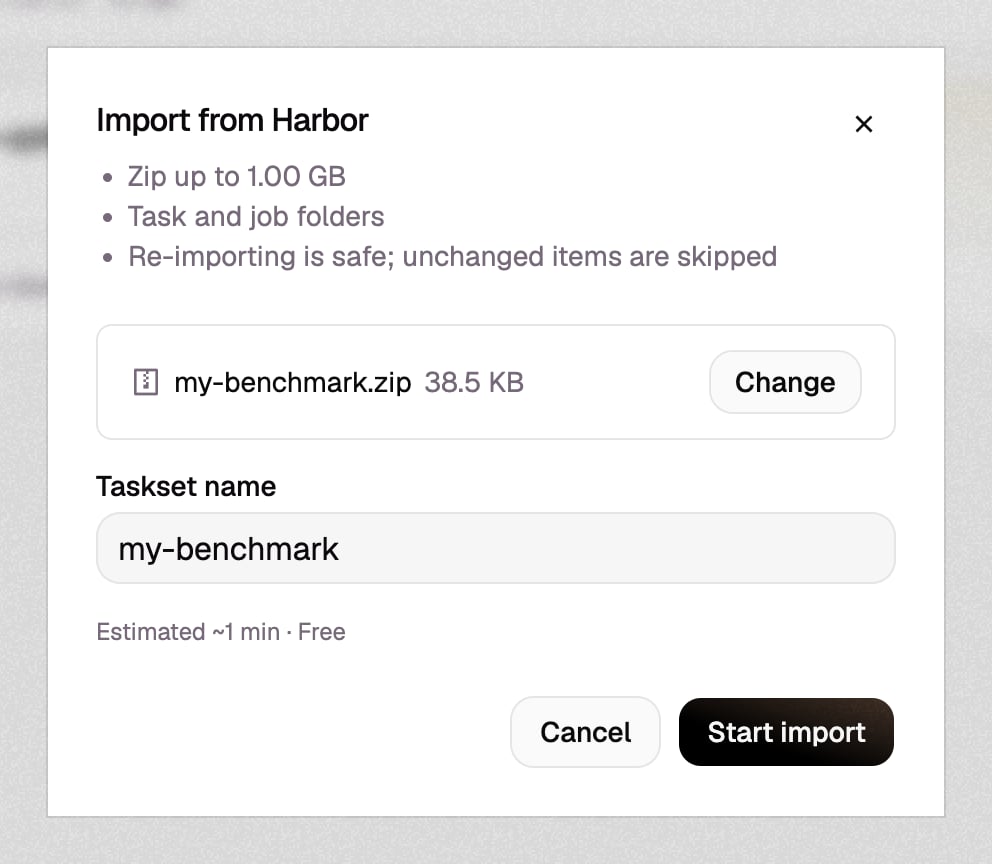 **Start import** opens the import on the taskset's **Imports** tab.
`hud harbor import` takes Harbor folders, or one zip of them, and zips folders for you:
```bash theme={"dark"}
hud harbor import ./tasks ./jobs/2026-10-01__12-00 --taskset my-benchmark
```
`--taskset` takes a taskset name or ID; a name with no taskset creates it. The command follows the
import until it ends and prints the report. `hud harbor imports` lists imports,
`hud harbor report ` prints the report of an earlier import, and
`hud harbor cancel ` stops a running one. See
[Harbor interoperability](/v6/experimental/harbor#import-into-hud) for every option.
The [Imports endpoints](/platform/rest-api#imports) take the same zip with format `harbor`:
1. `POST /v2/imports/uploads` reserves a data file and returns a presigned upload URL. Upload the
zip with `PUT`, then publish it with `POST /v2/data/{file_id}/complete`.
2. `POST /v2/imports` with `{"format": "harbor", "file_id": "...", "taskset_id": "..."}` starts the
import.
3. Poll `GET /v2/imports/{import_id}` until it ends, then read
`GET /v2/imports/{import_id}/report`.
## What an import creates
* **Tasks.** Each task folder becomes an environment named after the folder, created in the
taskset's Project on first import and suffixed when your team already has an environment of that
name, and a task of the taskset on that environment. The environment's version is the folder's
Harbor content digest: importing the same content again changes nothing, and changed content
becomes the environment's next version, which its task moves to in every taskset you can edit.
* **Jobs.** Each job folder becomes a HUD job, marked with a Harbor badge. Each finished trial
becomes a trace of the task it ran: its `agent/trajectory.json` (ATIF) becomes the trace's steps,
and its `result.json` and verifier reward become the trace's outcome. Unfinished trials are
skipped.
* **Links between runs and tasks.** A trial links to its task by the task digest in its
`lock.json`, or, for trials from Harbor versions without trial locks, by the `task_checksum` in
its `result.json`, matched against the task folders in the same zip. A task the zip does not hold
is looked up among Harbor environments already in the taskset's Project.
## Follow an import
An import is `queued`, `starting`, or `running` while it works, and `cancelling` after a cancel
request. It ends in one of four statuses:
| Status | Meaning | Report |
| - | - | - |
| `completed` | The import ran to the end. Items it skipped or HUD refused are listed in the report. | Yes |
| `stopped` | The import was refused or stopped partway: the zip could not be read, you cannot edit the taskset, or a platform or storage failure interrupted it. Its summary and report say why. The web app shows it as **Failed**. | Yes |
| `failed` | The import could not run to an outcome. Its error says why. | No |
| `cancelled` | You cancelled it. Anything imported before the cancel stays in the taskset. | No |
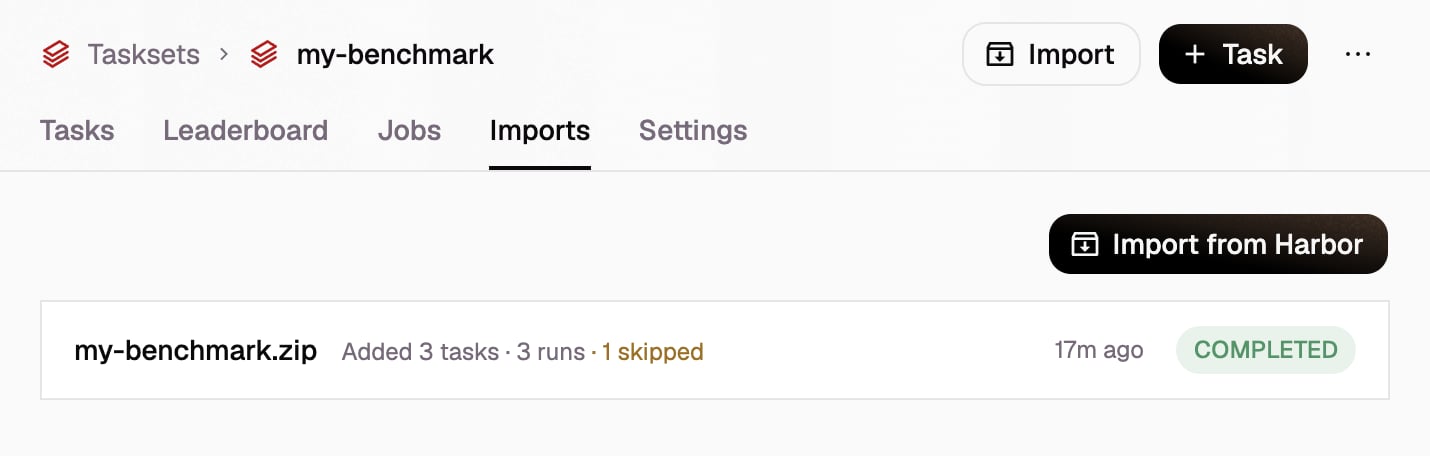
The taskset's **Imports** tab lists its imports, newest first, with what each added and how many
items it skipped or failed. Cancel a running import from its row.
**Start import** opens the import on the taskset's **Imports** tab.
`hud harbor import` takes Harbor folders, or one zip of them, and zips folders for you:
```bash theme={"dark"}
hud harbor import ./tasks ./jobs/2026-10-01__12-00 --taskset my-benchmark
```
`--taskset` takes a taskset name or ID; a name with no taskset creates it. The command follows the
import until it ends and prints the report. `hud harbor imports` lists imports,
`hud harbor report ` prints the report of an earlier import, and
`hud harbor cancel ` stops a running one. See
[Harbor interoperability](/v6/experimental/harbor#import-into-hud) for every option.
The [Imports endpoints](/platform/rest-api#imports) take the same zip with format `harbor`:
1. `POST /v2/imports/uploads` reserves a data file and returns a presigned upload URL. Upload the
zip with `PUT`, then publish it with `POST /v2/data/{file_id}/complete`.
2. `POST /v2/imports` with `{"format": "harbor", "file_id": "...", "taskset_id": "..."}` starts the
import.
3. Poll `GET /v2/imports/{import_id}` until it ends, then read
`GET /v2/imports/{import_id}/report`.
## What an import creates
* **Tasks.** Each task folder becomes an environment named after the folder, created in the
taskset's Project on first import and suffixed when your team already has an environment of that
name, and a task of the taskset on that environment. The environment's version is the folder's
Harbor content digest: importing the same content again changes nothing, and changed content
becomes the environment's next version, which its task moves to in every taskset you can edit.
* **Jobs.** Each job folder becomes a HUD job, marked with a Harbor badge. Each finished trial
becomes a trace of the task it ran: its `agent/trajectory.json` (ATIF) becomes the trace's steps,
and its `result.json` and verifier reward become the trace's outcome. Unfinished trials are
skipped.
* **Links between runs and tasks.** A trial links to its task by the task digest in its
`lock.json`, or, for trials from Harbor versions without trial locks, by the `task_checksum` in
its `result.json`, matched against the task folders in the same zip. A task the zip does not hold
is looked up among Harbor environments already in the taskset's Project.
## Follow an import
An import is `queued`, `starting`, or `running` while it works, and `cancelling` after a cancel
request. It ends in one of four statuses:
| Status | Meaning | Report |
| - | - | - |
| `completed` | The import ran to the end. Items it skipped or HUD refused are listed in the report. | Yes |
| `stopped` | The import was refused or stopped partway: the zip could not be read, you cannot edit the taskset, or a platform or storage failure interrupted it. Its summary and report say why. The web app shows it as **Failed**. | Yes |
| `failed` | The import could not run to an outcome. Its error says why. | No |
| `cancelled` | You cancelled it. Anything imported before the cancel stays in the taskset. | No |
The taskset's **Imports** tab lists its imports, newest first, with what each added and how many
items it skipped or failed. Cancel a running import from its row.
 ### Read the report
Open an import to read its report: every task, job, and trial in the zip, with its status and,
for anything skipped or failed, the reason. Tasks open the taskset's task, jobs open the job, and
trials open their trace. **Download** saves the original zip or the report as JSON.
### Read the report
Open an import to read its report: every task, job, and trial in the zip, with its status and,
for anything skipped or failed, the reason. Tasks open the taskset's task, jobs open the job, and
trials open their trace. **Download** saves the original zip or the report as JSON.
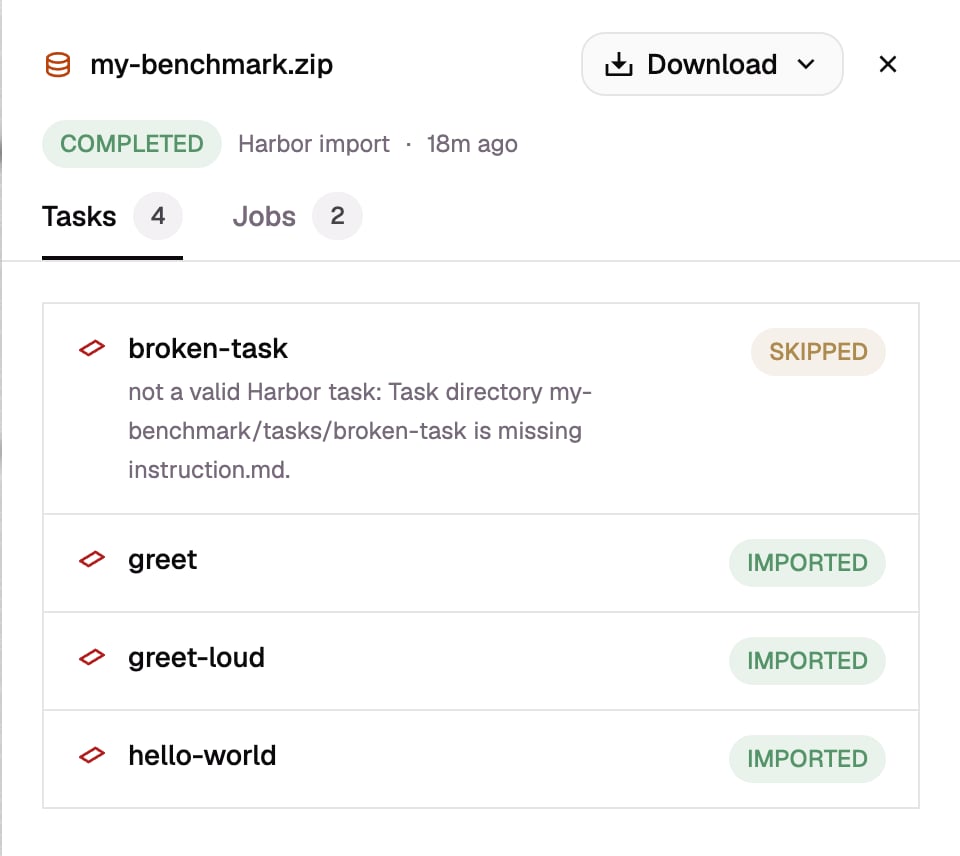 | Item status | Meaning |
| - | - |
| **Imported** | Added by this import. |
| **Updated** | A task whose changed content moved it to a new version. |
| **Unchanged** | Already in HUD from an earlier import. |
| **Skipped** | Not imported; the reason says why. |
| **Failed** | HUD refused the item; the reason says why. |
A job's status follows its trials, unless the job folder itself was skipped or HUD refused the job.
Skipped and failed items do not fail the import.
## Import again
Importing the same zip again is safe, and resumes an import that stopped: environments, tasks,
jobs, and traces are matched by digest and Harbor id instead of being created twice. To update a
task, change its folder and import it again; to add runs, import their job folders into the
taskset that holds the tasks.
## Limits and permissions
* The zip is at most 1 GiB, with at most 200,000 entries and 8 GiB unpacked. Import a larger set in
several imports into the same taskset.
* Harbor imports are free.
* You must be able to edit the taskset. Team admins see every import on the team; other members see
the imports they started.
* A team holds one Harbor environment per task folder name. A task folder whose environment
already exists in another Project fails, and two folders in one zip with the same name but
different content stop the import.
* A taskset holds one task per name. A task found in HUD joins the taskset only if the taskset has
no task of that name, and a trial of another version of a task links only if the taskset's task
has held that version.
* A trial without `lock.json` links only to a task folder in the same zip.
## Common skip reasons
| Reason in the report | What to do |
| - | - |
| `not a valid Harbor task: ...` | Harbor would not run the folder: its `task.toml` does not match Harbor's schema, it has no environment, or it lacks `instruction.md` or a test script. Fix the folder until `harbor run` accepts it. |
| `same content as , which is imported` | The zip holds the same task twice. Nothing to do. |
| `the trial has not finished` | Harbor was still running the trial when the job folder was zipped. Import the job again once it finishes. |
| `a trial outside its job folder; include the whole job folder` | Zip the job folder, not individual trial folders. |
| `it ran '' (sha256:...), which is neither in the bundle nor a Harbor task in HUD` | Import the task folder, in the same zip or before the job, into the same taskset. |
| `... task folder differs from it, so it changed after the run` | The task changed after the trial ran. Import the task folder as it was when the trial ran into the taskset, then import the job. |
| `it has no lock.json and its task_checksum matches no task folder in the bundle` | Trials from Harbor versions without `lock.json` link only to a task folder in the same zip. Include the unchanged task folder. |
| `its task is in HUD environment , which belongs to a Project other than the taskset's` | Import into a taskset in that Project. |
| `its task is in several HUD environments (...)` | The same task content was imported under several names. Include the task folder in the zip to pick one. |
| `... is not a Harbor job result: ...` or `... is not a Harbor trial result: ...` | The job or trial files do not load with Harbor's models. Check the Harbor version that wrote them. |
This documentation is built and hosted on [Mintlify](https://mintlify.com), a developer documentation platform.
| Item status | Meaning |
| - | - |
| **Imported** | Added by this import. |
| **Updated** | A task whose changed content moved it to a new version. |
| **Unchanged** | Already in HUD from an earlier import. |
| **Skipped** | Not imported; the reason says why. |
| **Failed** | HUD refused the item; the reason says why. |
A job's status follows its trials, unless the job folder itself was skipped or HUD refused the job.
Skipped and failed items do not fail the import.
## Import again
Importing the same zip again is safe, and resumes an import that stopped: environments, tasks,
jobs, and traces are matched by digest and Harbor id instead of being created twice. To update a
task, change its folder and import it again; to add runs, import their job folders into the
taskset that holds the tasks.
## Limits and permissions
* The zip is at most 1 GiB, with at most 200,000 entries and 8 GiB unpacked. Import a larger set in
several imports into the same taskset.
* Harbor imports are free.
* You must be able to edit the taskset. Team admins see every import on the team; other members see
the imports they started.
* A team holds one Harbor environment per task folder name. A task folder whose environment
already exists in another Project fails, and two folders in one zip with the same name but
different content stop the import.
* A taskset holds one task per name. A task found in HUD joins the taskset only if the taskset has
no task of that name, and a trial of another version of a task links only if the taskset's task
has held that version.
* A trial without `lock.json` links only to a task folder in the same zip.
## Common skip reasons
| Reason in the report | What to do |
| - | - |
| `not a valid Harbor task: ...` | Harbor would not run the folder: its `task.toml` does not match Harbor's schema, it has no environment, or it lacks `instruction.md` or a test script. Fix the folder until `harbor run` accepts it. |
| `same content as , which is imported` | The zip holds the same task twice. Nothing to do. |
| `the trial has not finished` | Harbor was still running the trial when the job folder was zipped. Import the job again once it finishes. |
| `a trial outside its job folder; include the whole job folder` | Zip the job folder, not individual trial folders. |
| `it ran '' (sha256:...), which is neither in the bundle nor a Harbor task in HUD` | Import the task folder, in the same zip or before the job, into the same taskset. |
| `... task folder differs from it, so it changed after the run` | The task changed after the trial ran. Import the task folder as it was when the trial ran into the taskset, then import the job. |
| `it has no lock.json and its task_checksum matches no task folder in the bundle` | Trials from Harbor versions without `lock.json` link only to a task folder in the same zip. Include the unchanged task folder. |
| `its task is in HUD environment , which belongs to a Project other than the taskset's` | Import into a taskset in that Project. |
| `its task is in several HUD environments (...)` | The same task content was imported under several names. Include the task folder in the zip to pick one. |
| `... is not a Harbor job result: ...` or `... is not a Harbor trial result: ...` | The job or trial files do not load with Harbor's models. Check the Harbor version that wrote them. |
This documentation is built and hosted on [Mintlify](https://mintlify.com), a developer documentation platform.